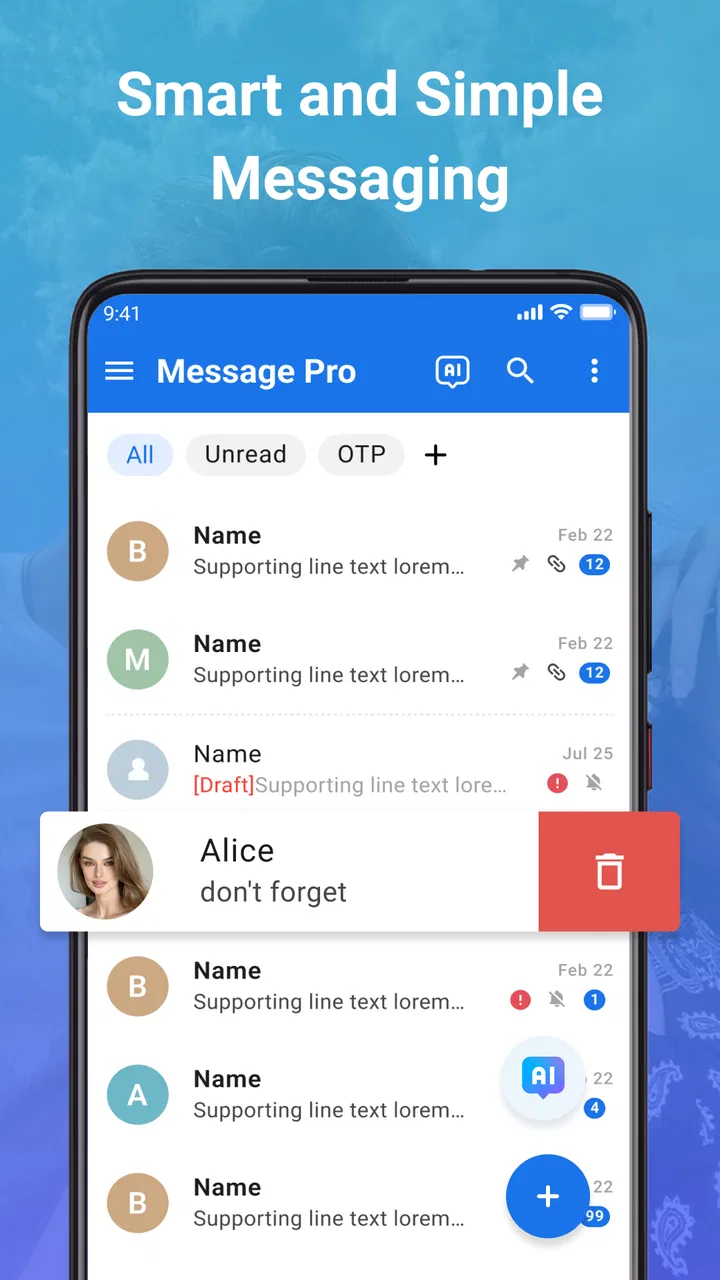
Messages - SMS + MMS Messenger
- 4.0
- Rating
- 500.00K
- Installs
- Free
- Price

 Analysis by App-foxy
I approached Messages - SMS + MMS Messenger as a practical communication app rather than as a flashy replacement for every messaging service on my phone. Its purpose is straightforward: handle ordinary SMS and MMS conversations in one place, with an emphasis on simplicity and privacy. That makes the important questions less about novelty and more about trust, control, reliability, and whether the app fits comfortably into daily communication.
The app comes from Dovi AI and is available free of charge, although optional in-app purchases range from $4.99 to $14.99 per item. It is rated for Everyone, works on Android 7.0 and later, and has reached over 500,000 installs. The current version is 2.3.39, while the app first appeared on December 12, 2024. Those details place it in an interesting position: it is established enough to have a meaningful user base, but still relatively new compared with the default messaging tools built into many phones.
What I like most is that the app invites a careful, everyday evaluation. If I am choosing a messenger for family updates, appointment reminders, delivery messages, or conversations with people who do not use the same internet chat platform, I want predictable behavior. I also want to understand what I am agreeing to, what I can control, and when a conventional SMS app may still be the better choice.
You May Also Like

 Blood Strike: 2.5 Anniversary
Blood Strike’s Loadouts Turn Every Drop Into a Tactical Gamble
A close look at Blood Strike’s custom loadouts: how fast access to signature weapons reshapes its battle royale rhythm, rewards preparation, and narrows the gap between fights.

 Pandora - Music & Podcasts
Pandora’s Music Is Easy to Start, but Harder to Recover
Pandora’s strength is its low-effort path from a seed to a station. Its weak spot is how much confidence it asks you to place in connection, setup, and quiet recovery.

 8 Ball Pool
 Is Built on Rivalries, Rematches, and Routine
A close look at the rivalries, rematches, shared routines, and unanswered safety questions that turn a quick pool match into a persistent mobile community.

 Samsung Music
’s Quiet Strength Is Playing What You Already Own
Its reach comes less from spectacle than from dependable access to a personal library. That simplicity is both the app’s strongest retention engine and its ceiling.

 AccuWeather: Weather Radar
AccuWeather Review: A Quick, Clear Forecast for Everyday Decisions
For everyday plans, the best forecast is the one you can understand quickly. AccuWeather makes rain timing, radar, and local conditions easy to act on, with a few trade-offs.

 Hill Climb Racing
Why Hill Climb Racing Still Turns Crashes Into One More Run
A tiny car, a bumpy hill and one more upgrade: Hill Climb Racing keeps resurfacing because its simple chaos makes every near-miss feel personal.
More From Our News Desk



How Messages - SMS + MMS Messenger earns trust in ordinary use
I judge trust in a messaging app by the small routines that keep it dependable, not by a reassuring label alone. Here, I’d make a habit of checking notification visibility after setup and after meaningful setting changes, then keep one low-stakes conversation handy for confirming that replies still arrive as expected. That gives me a practical baseline before I rely on it for time-sensitive messages.
A focused alternative to the default SMS app
My first impression is that Messages - SMS + MMS Messenger is designed for people who want their text conversations kept uncomplicated. It belongs to the communication category, but it is not trying to be a social network, a public community, or a broad collaboration suite. That focus matters because SMS and MMS already have a clear role: they connect people through mobile carrier messaging, including contacts who may not share an account on a third-party chat service.
Compared with a built-in phone messenger, the main reason to try this app is the possibility of a cleaner or more comfortable experience. The usual alternative has one major advantage: it is already integrated into the phone and is often familiar to everyone using the device. A separate app has to earn its place by making conversations easier to manage or by giving users a better sense of control. I would not switch merely because the icon or interface looks different.
That is the first useful trade-off. A dedicated messenger can feel more intentional, but the default app usually creates less setup friction. If your current SMS tool opens quickly, handles picture messages correctly, and gives you the controls you need, changing apps may not produce a dramatic benefit. Messages - SMS + MMS Messenger makes more sense when you are actively looking for an alternative, not when your existing setup is already working perfectly.
What the public reception suggests, and what it does not prove
The app holds a 4.0 average from around 1,800 ratings, with close to 200 written reviews. I read that as a sign of a generally workable experience rather than a guarantee that every phone and carrier combination will behave identically. Messaging apps are unusually dependent on device settings, carrier support, default-app rules, battery management, and notification behavior, so a good overall score cannot remove the need for a short personal test.
That test should happen before making the app your only messaging tool. I would install it, check whether it can become the default SMS application on my phone, send a normal text, receive a reply, and then test a picture message with someone I trust. I would also restart the phone and confirm that incoming notifications still appear. This small routine tells me more about suitability than a quick look at the store page.
The same approach helps with privacy expectations. The app’s positioning emphasizes private communication, but I avoid treating a short slogan as a complete technical explanation. SMS and MMS are carrier-based services, so privacy depends on more than the interface on the screen. I judge the app by the controls it visibly offers and by the choices I can review, rather than assuming that a privacy-oriented presentation changes how mobile messaging itself works.
Permissions and data-sensitive decisions
For a messenger, access to contacts, notifications, phone-related functions, and message content can be closely tied to its purpose. I pay attention to the permission prompts shown during setup and consider whether each request makes sense for the task I am trying to perform. I do not grant everything automatically just to reach the inbox faster.
A sensible setup habit is to begin with the minimum permissions needed for the first test. If the app asks for access that is not immediately necessary, I prefer to postpone that decision until I understand which function requires it. This does not prove that a permission is inappropriate; it simply keeps the decision in my hands. I can then enable an option when I have a clear reason, such as needing contact names displayed instead of raw numbers.
Message content is especially sensitive because SMS and MMS often contain verification codes, delivery details, medical reminders, family information, or financial alerts. I would avoid treating a new messenger as a place to experiment with confidential material on day one. I first use ordinary, low-risk conversations and inspect how notifications appear on the lock screen. A message can be private inside the app but still visible in a notification preview if the phone is configured that way.
That is one of the less obvious privacy points: the app is only one layer of the communication chain. The operating system’s notification settings, the device’s screen lock, the carrier network, backups, and the recipient’s phone all affect the practical privacy of a text. Messages - SMS + MMS Messenger can give me an interface for handling conversations, but it cannot turn a carrier message into a completely different kind of communication.
Keeping control during setup and everyday use
I recommend making the default-app decision deliberately. On Android, the application handling SMS may have access to system-level messaging behavior that another installed messenger does not. I would not change the default immediately if I were unsure. I would first explore the app, then switch only after confirming that I can still find the system setting to change back.
This is also where user agency matters more than visual polish. I want to know whether I can dismiss permission requests, adjust notification visibility through the phone, remove the app without losing access to messages stored elsewhere, and return to the previous messenger if the experience is not right for me. These are practical control questions, not abstract privacy concerns.
When testing, I would use a small checklist:
- Send a short text to a contact who can reply quickly.
- Receive a reply while the phone is locked and inspect the notification preview.
- Try a picture message and confirm that it arrives in both directions.
- Check whether contact names appear as expected after reviewing contact access.
- Open the phone’s default-app and notification settings so I know where to reverse changes.
This workflow exposes problems that are easy to miss in a five-minute trial. A text may send successfully while picture messaging behaves differently. Notifications may appear while the app is open but become delayed when the phone is idle. Contact matching may be convenient only after granting broader access. I would rather discover those differences with a routine conversation than during an urgent family message.
Real situations where the app makes sense
Imagine that I am coordinating a pickup with a relative who does not use an internet messaging platform. I need to send a short address, receive a confirmation, and perhaps share a photo of the correct entrance. A focused SMS and MMS app is useful here because the conversation stays connected to ordinary mobile messaging instead of requiring both people to adopt the same account-based service.
Another realistic case is a small household where one person prefers the phone’s original messenger and another wants a different interface. Messages - SMS + MMS Messenger may be worth trying on one device, but I would not assume that changing the app on one phone changes the experience for everyone else. Each participant’s carrier, device, and messaging application still matter.
It can also suit someone who wants to separate communication habits. For example, I might reserve an internet chat platform for group communities and use this app for carrier-based conversations with relatives, service providers, and contacts who are not active on those platforms. That separation can reduce confusion, especially when I need to search for a practical message later.
On the other hand, I would skip it if my main requirement is encrypted, account-based chat across multiple devices. An SMS-focused application is not automatically a substitute for a service built around internet messaging, synchronized conversations, desktop clients, or large group collaboration. If those are the features I depend on, I would compare this app against a dedicated internet messenger instead of judging it as though it promised the same system.
Where the free model deserves attention
The free download lowers the barrier to testing, which I appreciate. I can evaluate the workflow before deciding whether it deserves a permanent place on my phone. Optional purchases between $4.99 and $14.99 per item mean that I would inspect every purchase screen carefully and avoid assuming that a paid option is necessary for basic messaging.
My advice is to use the free experience as a complete trial, not as a rushed preview. I would note which functions I actually use during several normal conversations and only then consider whether an optional purchase offers something valuable to me. The presence of in-app purchases does not automatically make the app poor value, but it does make it important to distinguish essential communication from cosmetic or convenience-oriented extras.
I would also keep expectations realistic about the word “free.” Sending SMS and MMS can involve the user’s mobile plan or carrier charges, depending on that plan. The app itself may not charge for the download, but the underlying mobile service remains separate. Anyone with a limited texting or data allowance should check their carrier terms before sending a large number of picture messages.
Version, compatibility, and practical testing
The current release is 2.3.39, and the minimum requirement is Android 7.0. That broad compatibility is useful for people using older Android phones, but compatibility on paper does not guarantee identical behavior across devices. Manufacturers manage background activity and notifications differently, and carrier implementations can vary as well.
For that reason, I would pay special attention to battery restrictions. If notifications arrive late, I would check whether the phone has placed the app in a restricted background category. I would also look at notification channels and lock-screen visibility. These steps are not glamorous, but they often determine whether a messaging app feels reliable during the moments when I am not actively looking at it.
Picture messaging deserves its own test because MMS can be more sensitive to mobile-network configuration than a simple text. I would try it on mobile data, not just Wi-Fi, and confirm that the recipient can open the image. If that test fails, I would check the phone’s carrier settings before blaming the app. The important point is to identify the source of the problem rather than repeatedly reinstalling applications without understanding the connection.
I would make that test before moving important conversations into the new app. If everything works, the switch becomes a measured choice. If something fails, I have a clear record of what happened and can return to the previous messenger without having made the change during an emergency.
What I would watch over time
Trust in a communication app is not created by one successful message. I would continue checking whether notifications remain dependable after updates, whether permission choices stay understandable, and whether the application continues to let me manage the experience through visible settings. I would also pay attention to whether purchase prompts interrupt basic messaging or make the free version feel unnecessarily constrained.
The developer, Dovi AI, gives the app a clear identity, but a developer name alone is not a reason to surrender caution. I prefer to judge the application through behavior: whether it asks for sensible access, whether it respects the choices I make, and whether I can leave without losing control of my device’s messaging setup.
There is a useful distinction between privacy language and privacy practice. A privacy-minded user should read the app’s current privacy information, review the permissions presented on their own device, and consider the limitations of SMS and MMS as technologies. I would not infer end-to-end protection, zero data handling, or complete anonymity from the app’s short positioning. Those are separate claims that require separate evidence.
My cautious verdict
After looking at Messages - SMS + MMS Messenger as a real daily tool, I see a reasonable option for Android users who want to try a dedicated SMS and MMS interface without paying to download it. Its strongest case is practical: it can serve people who communicate with ordinary mobile numbers and want an alternative to the preinstalled messenger. The Everyone rating and support for Android 7.0 or later also make it accessible to a broad range of users.
My recommendation comes with a condition: test it gradually. Keep the default-app setting in mind, review permissions one by one, inspect lock-screen notifications, and verify both text and picture messaging with a trusted contact. Those steps give me meaningful control and reveal whether the app works properly with my particular phone and carrier.
I would recommend it to someone who values a focused SMS and MMS experience, wants to explore a different messenger, and is comfortable making careful permission and notification decisions. I would not recommend replacing a reliable default app purely because this one sounds more private, nor would I choose it for needs centered on encrypted internet chat, multi-device synchronization, or advanced group collaboration.
In short, this is an app worth trying with measured expectations. The best reason to install it is not the promise of a perfect messenger, but the chance to evaluate a focused alternative while keeping your own choices visible and reversible. If its everyday tests pass and its controls feel comfortable, it may become a useful part of your communication routine. If they do not, the sensible decision is to return to the tool that handles your messages more reliably.
FAQs for Messages - SMS + MMS Messenger
01What features does Messages - SMS + MMS Messenger offer?
Messages - SMS + MMS Messenger provides a comprehensive suite of features including text messaging, multimedia messaging (MMS), group chats, and customizable themes. Users can also enjoy quick reply options, emoji support, and message scheduling. The app is designed to provide a seamless and efficient messaging experience with an intuitive user interface.
02Is Messages - SMS + MMS Messenger secure and private?
Yes, Messages - SMS + MMS Messenger prioritizes user privacy and security. It employs end-to-end encryption to ensure that all messages are securely transmitted and accessed only by the intended recipients. Additionally, the app offers options to lock individual conversations with a password or fingerprint for added security.
03Can Messages - SMS + MMS Messenger be used offline?
Messages - SMS + MMS Messenger can send and receive SMS messages offline, as these messages are transmitted through your cellular network. However, MMS and other internet-dependent features such as media attachments and backup require an active internet connection to function properly.
04Is Messages - SMS + MMS Messenger compatible with all devices?
The app is compatible with most Android and iOS devices. It requires a minimum operating system version—Android 5.0 (Lollipop) or iOS 10.0 and above. Ensure your device meets these requirements to enjoy all the features the app offers without any compatibility issues.
05Does Messages - SMS + MMS Messenger support customization?
Yes, the app supports extensive customization options. Users can personalize their messaging experience by choosing from a variety of themes, fonts, and notification tones. The app also allows users to customize individual chat backgrounds and set unique notification settings per contact.
Pros
- User-friendly with a clean interface.
- Supports multimedia messages seamlessly.
- Customizable notifications and themes.
- Integrates well with other apps.
- Reliable delivery and read receipts.
Cons
- Lacks end-to-end encryption.
- Limited advanced features.
- Occasional ad pop-ups.
- No cross-platform syncing.
- Minimal personalization options.

Messages - SMS + MMS Messenger
Gallery